Blog Outline Generator: Why Most Tools Get It Wrong (And What to Look For)

Devesh Khanal
Devesh is co-founder of both Wave Writer and Grow and Convert, the content marketing agency whose strategy and processes were the origin of founding Wave Writer.
July 21, 2026
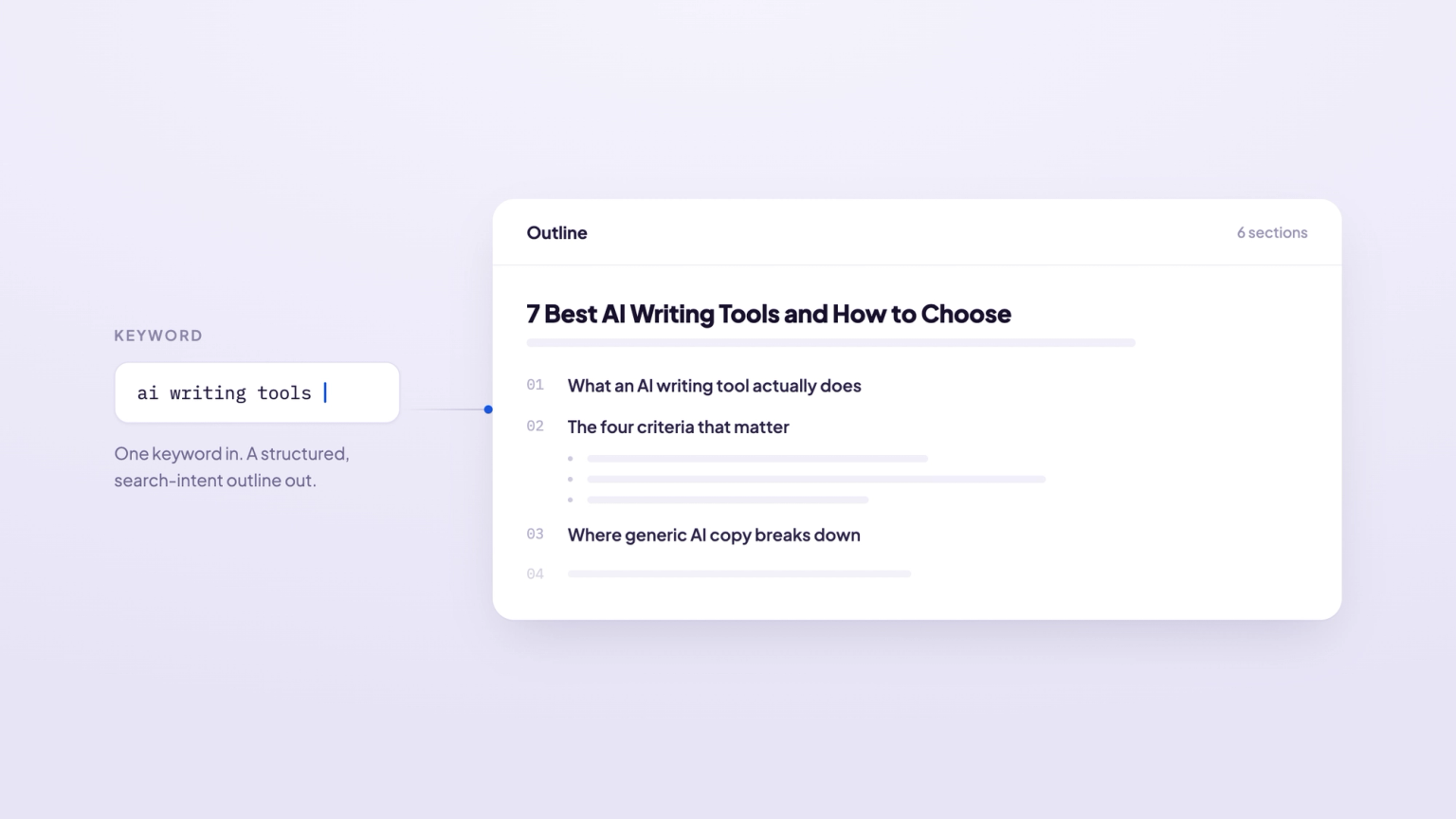
Most blog outline generators work the same way: you enter a topic, and the AI spits out a list of headings — an H1, a few H2s, maybe some H3s. It takes about 10 seconds and looks organized enough.
The problem is that these outlines are horrible. They are extremely surface level, lack any useful substance, and absolutely do not come close to expressing anything remotely resembling a unique perspective from your brand.
The reason they’re like this is that they don’t factor in the things you need to produce an actually good, high quality blog article (or outline):
Who's searching for this keyword? Who is the target reader / customer?
What Google is rewarding for the query?
What the top-ranking pages are covering (and missing)?
How should your specific product or business should be woven into the piece? What are features, benefits or differentiators matter for this keywords and topic?
The last point is a big one: none of the outline generators we’ve tested take the time to understand your business, your product, your features, your differentiators, or your customers. All they do is scan the SERP and parrot back the same headings that every other piece uses. This produces content that sounds like everyone else. It says nothing unique, nothing original, and nothing worth remembering.
We built Wave Writer to solve this. In particular, we built an outline feature that:
Actually understands your business (it reads content to understand your business first) and ties that into the keyword
Accounts for who is searching and what their pain points are
Accounts for where they are in the buying funnel so you know how much or how little to sell your product
Gives you multiple ideas for angling the piece, including fully written blog intros
Gives you its reasoning and analysis for why it’s suggesting each section in the outline.
We call these Super Briefs. Below we’ll cover how it works and contrast that with other outline generators so you can see the difference. If you want, you can try Wave Writer out yourself here.
Examples of Bad Outline Generators
Let’s look at some popular blog outline generators to show you how limited they are. For all of these examples (and later for Wave Writer itself) I’m going to use the keyword:
blog outline generator
which is what this exact piece is targeting. Yes, I produced this piece using Wave Writers’ outline (and also it’s draft feature), with edits at both step from me.
Writer.com’s Tool
Here are the input fields form Writer.com’s blog outline generator tool:
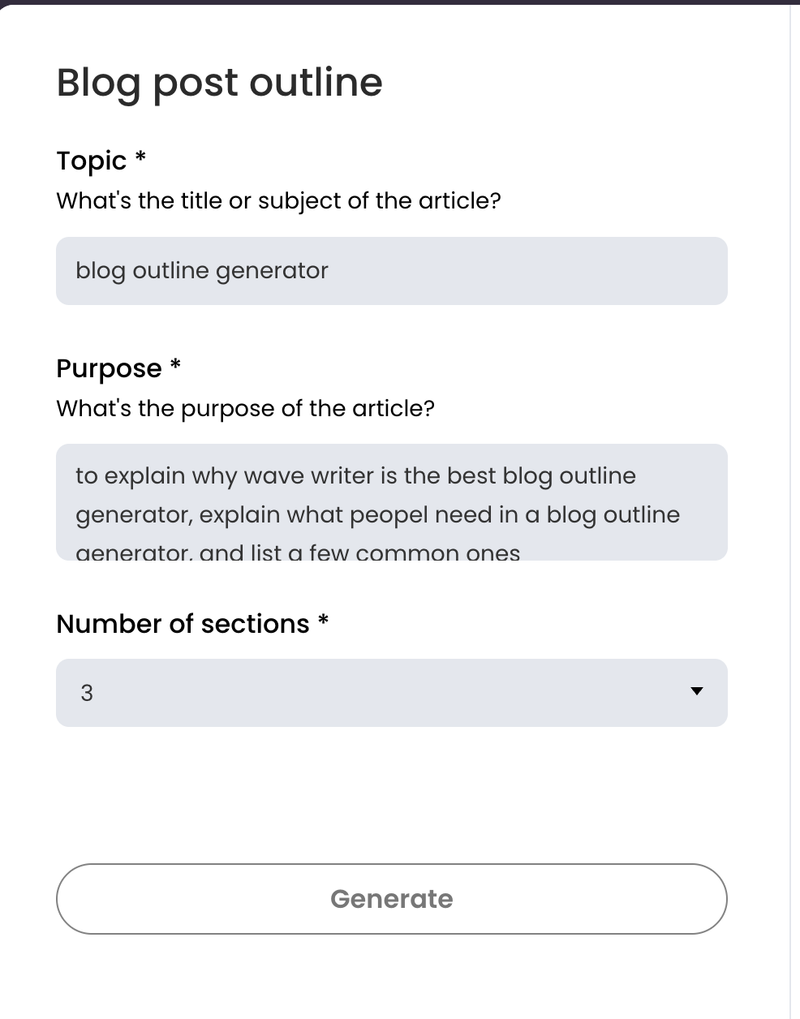
Note what it’s missing:
What is the brand or product? (it blows our mind that it’s trying to generate an outline without this)
Who is the target customer of that product?
What else is ranking for this keyword and what are their strengths or weaknesses?
How in the world can you produce a unique, original piece of content, that has a shot of ranking for this keyword, without this info? You can’t.
And, expectedly, this is the result:
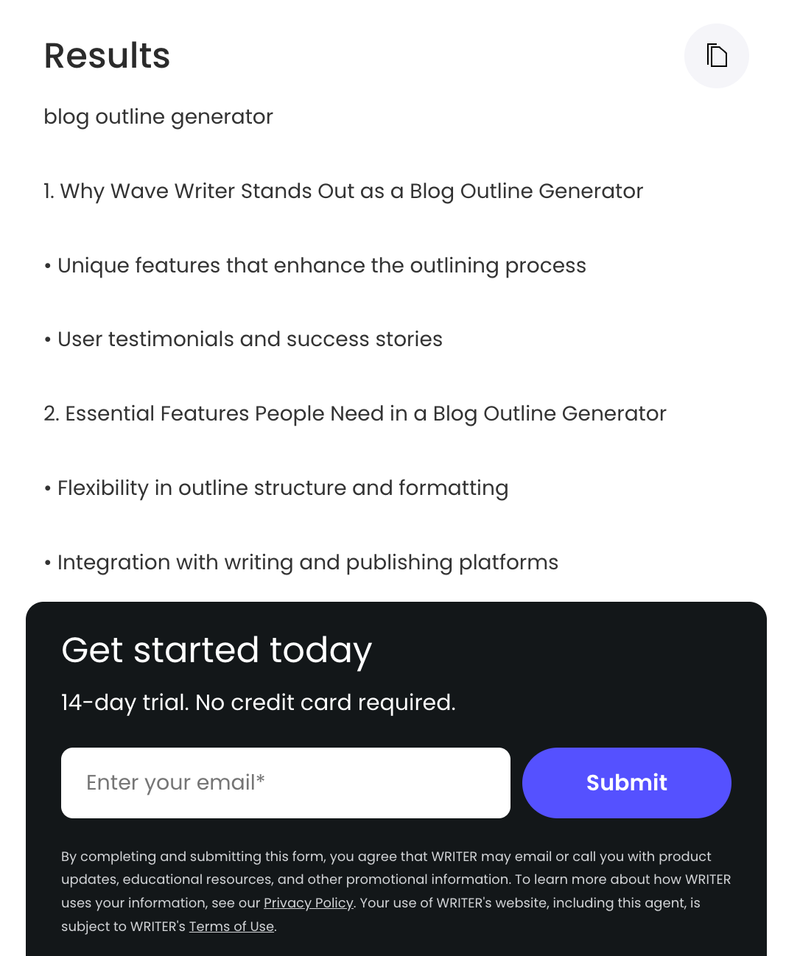
This is the most generic outline I’ve ever seen. No writer or marketer needs a tool, AI powered or not to help tell them these things. This is effectively useless.
Ryan Robson’s Outline Tool
Similarly, here is the top ranking tool when you Google “blog outline generator”:
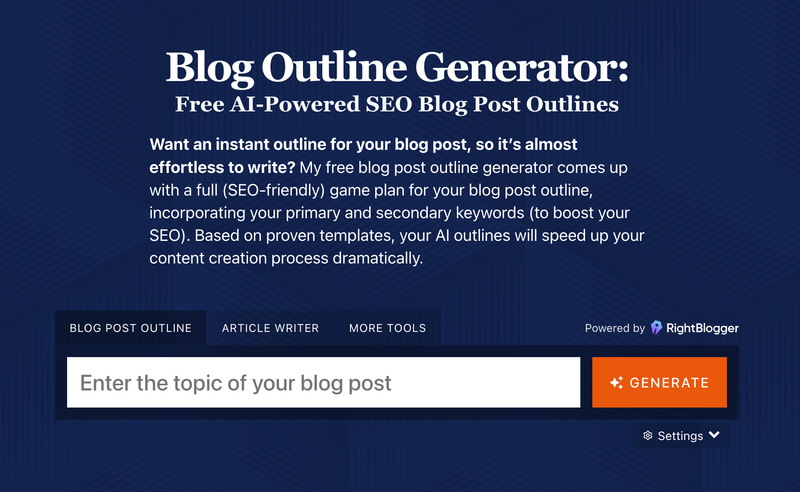
This takes in even less info about your business, product, customer, or the serp! All it asks for is the topic.
So once again the output is very generic
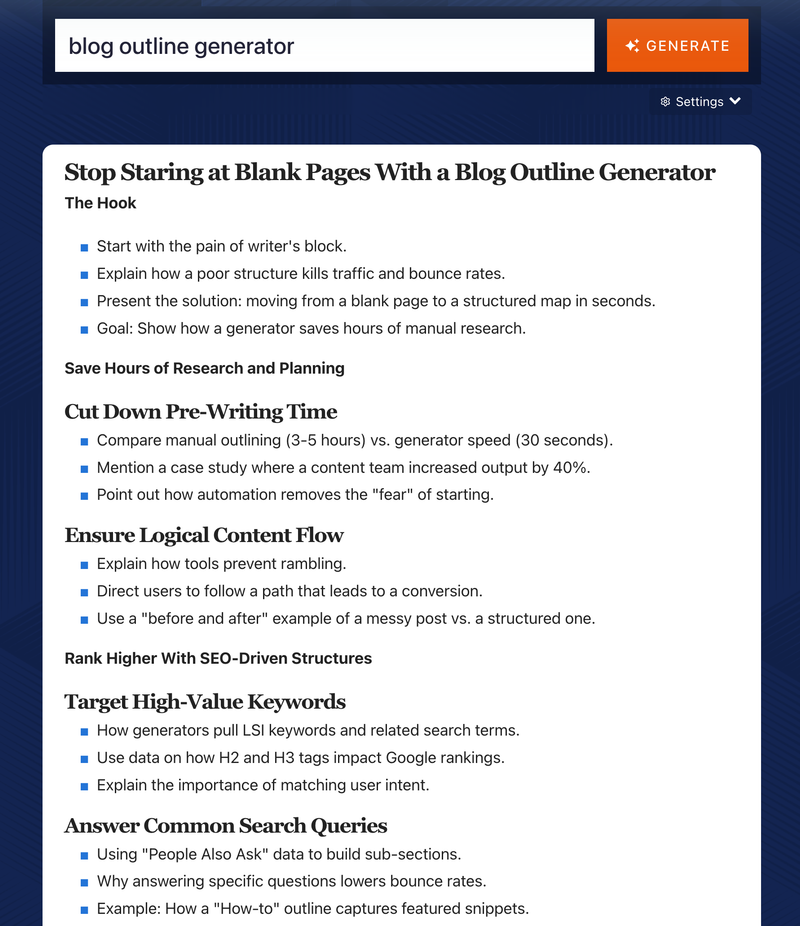
This is better than Writer’s but note how generic it is. There is zero information that’s related to your business. You could be writing this as a tool, as an agency, or as a random solo blogger, the tool doesn’t care. It assumes you can write the same post for all three people, but that’s not true!
Google this keyword yourself (blog outline generator), note how almost all of the top results are actual tools, not just blog posts explaining why an outline helps you write.
This outline has no discussion around that. It doesn’t factor in the SERP at all.
3 Criteria For Good Blog Outline Generators
I mentioned these three criteria above, but let’s do a bit of a deep dive on why each is important to creating a blog outline (and subequent draft that’s actually good:
1. Who is actually searching for this keyword and what pain point they have. You need to know the audience you’re writing to! If your comeback is, “But I know the keyword, it’s anyone Googling the keyword” just think about how many different people could google “blog outline generator”. It could be a solo mommy blogger in her living room or it could be a junior marketer at a large company. Either could Google that, but that’s two very different needs and budgets. The way you talk to them is different. Their pain points are different. The language they use is different. Knowing your audience matters.
2. What the top-ranking pages are already covering and where they're weak. The SERP (search engine results page) tells you waht Google is favoring for that keyword. It’s basic SEO to factor that in. It should identify patterns in those top pieces, and even where they fall short so you can try to write something better.
3. How your specific business, product, or expertise should be woven into the piece. This is critical. Without business context, your outline will produce content that could be published on any competitor's blog. For marketing teams whose content needs to convert readers into customers, this is a dealbreaker. If the outline doesn't account for your product's features, benefits, and positioning, the resulting content won't either.
Bonus: A useful outline also includes reasoning for why each section is included — not just what to write, but why this section helps you rank or convert. This lets the writer or editor evaluate and refine the outline instead of blindly following it. When you can see that a section was suggested because it addresses a gap in the current SERP results, or because it creates a natural place to introduce your product, you can make an informed decision about whether to keep it, cut it, or reshape it. That's a very different experience from staring at a list of AI-generated headings and wondering if they're any good.
Wave Writer: A Blog Outline Generator That Analyzes the SERP and Understands Your Business
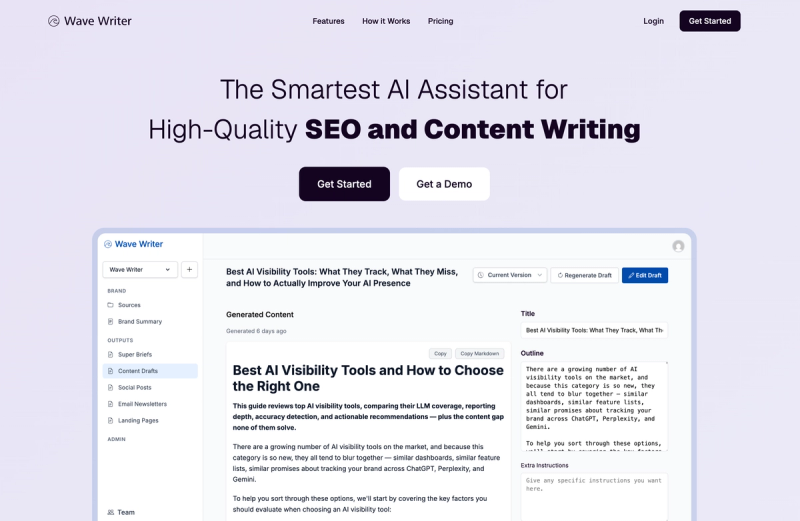
Wave Writer's Super Briefs feature functions as a blog outline generator, but one that goes far beyond generating a list of headings from a topic. It produces a full strategic content plan informed by SERP analysis, search intent, and a deep understanding of your specific business.
That last part is key. Before generating any outline, Wave Writer first learns your business by reading uploaded sources (blog posts, product documentation, value propositions, positioning statements, competitive comparisons) and creates an editable brand summary capturing your products, features, customer personas, pain points, and competitive alternatives.
Let’s go through each part of the super brief, ending with the outline. I’ll use the actual outline and analysis it produced for the keyword “blog outline generator” which turned into this post you’re reading.
Search Intent Analysis
Wave starts by analyzing search intent: who is likely searching (which of your customer personas), what problem they're trying to solve, and what type of content Google is rewarding for that query. Here’s a sample:
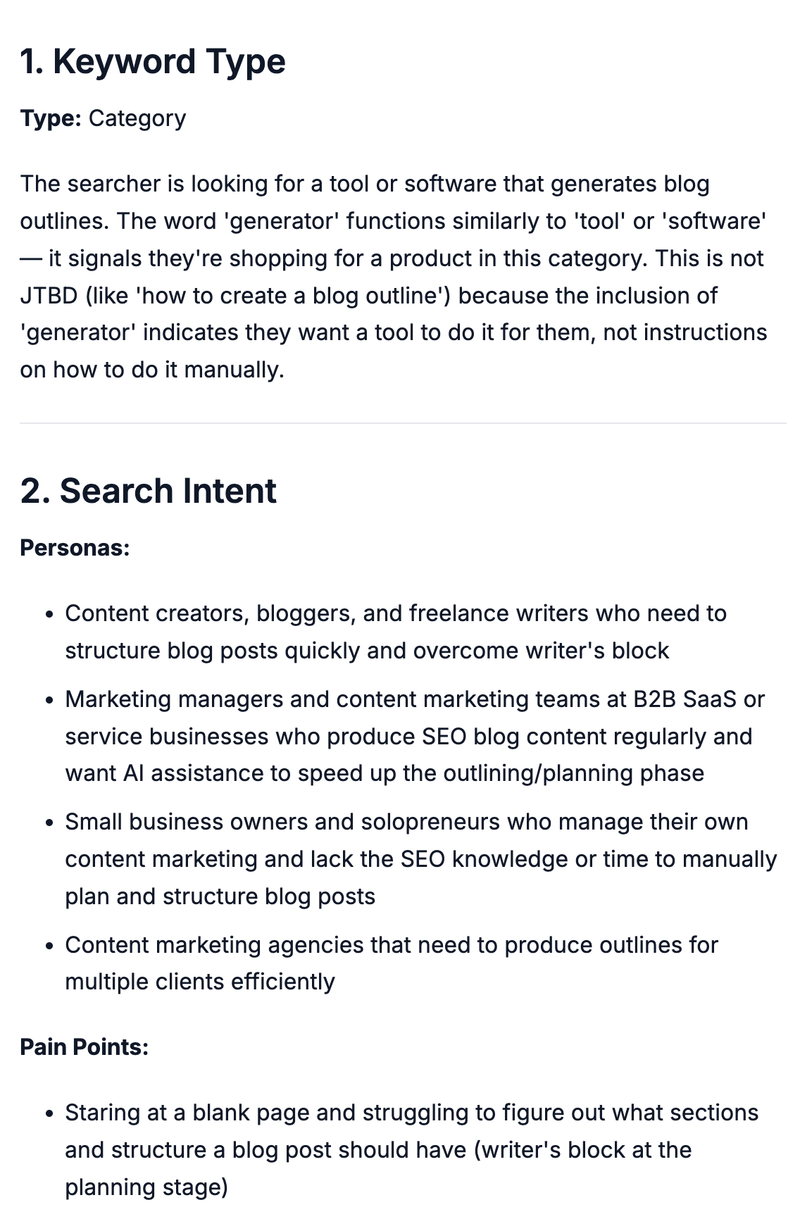
Note it uses Grow & Convert's Pain Point SEO methodology to categorize keywords into intent buckets — category keywords (bottom of funnel), comparison and alternative keywords, jobs-to-be-done keywords (more top of funnel). This matters because the type of keyword fundamentally changes what your outline should look like. A category keyword where someone is actively shopping for a tool calls for a very different structure than a jobs-to-be-done keyword where someone is still figuring out how to solve a problem.
SERP Analysis
Wave Writer then fetches, reads, and analyzes the actual content of the first 10 results on the SERP. It doesn’t just scan headlines either. It actually reads the first 1,000 words of each piece and analyzes patterns in what Google is favoring, what arguments the top pages are making, and where the weaknesses are.
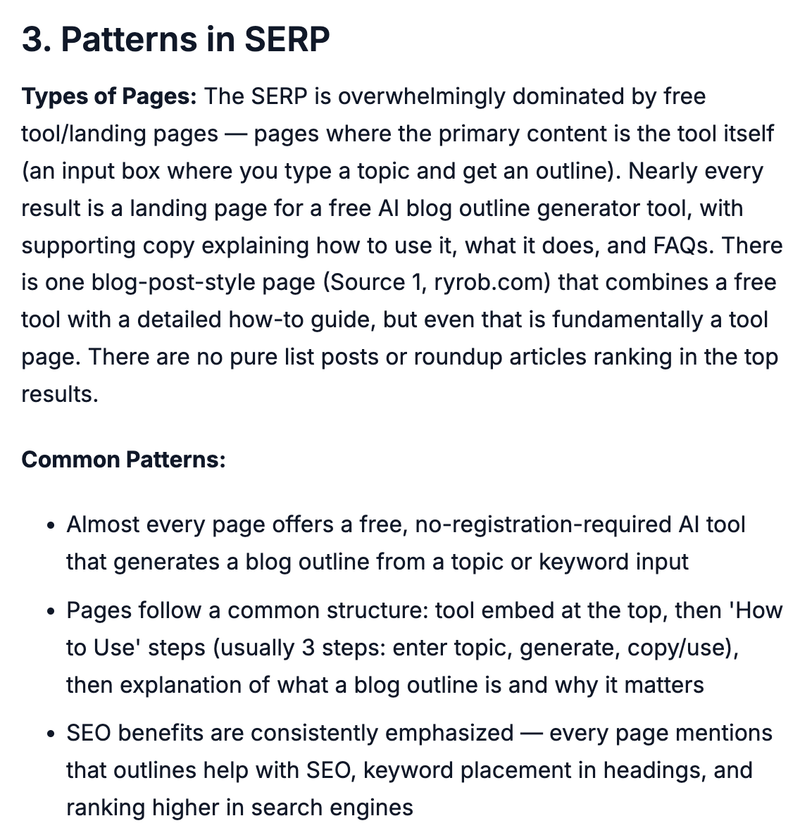
Here are 2 of the 6 bullets of weaknesses it found in the SERP for this keyword:
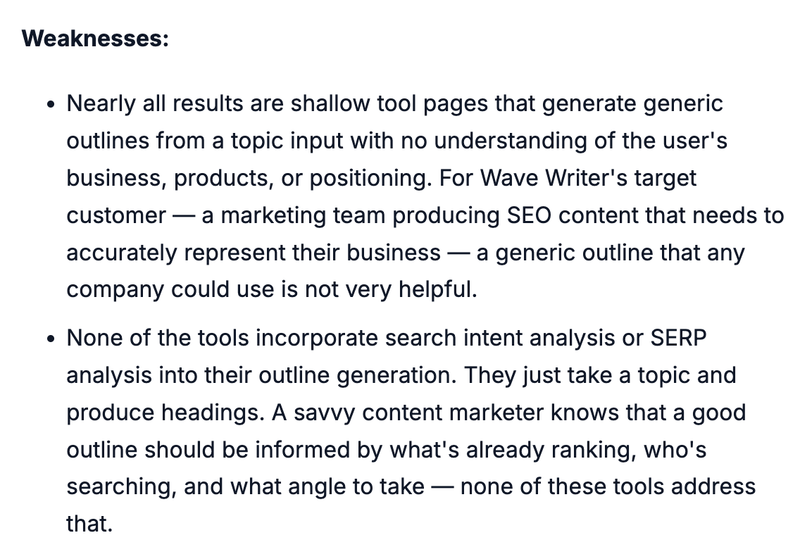
In our experience having filtered through thousands of freelance writer applications and trained and worked with hundreds of writers over the years, this is more in depth than what most freelancers do when given a keyword. Most writers (and most outline generators) skip this step entirely and just write based on general knowledge of the topic. That's how you end up with content that covers the same ground as everyone else without adding anything new.
How to Pitch Your Product
Based on this analysis combined with its understanding of your business, Wave Writer suggests strategic content angles that fit the search intent, recommends which of your product features or benefits make sense to introduce for this specific keyword, and shows how to incorporate your perspective without forcing a sales pitch.
For content formats, Wave always suggests a safe option that’s most like what everyone else has published for this keyword and a contrarian or unique format that should get your creative wheels turning in terms of more original ideas:
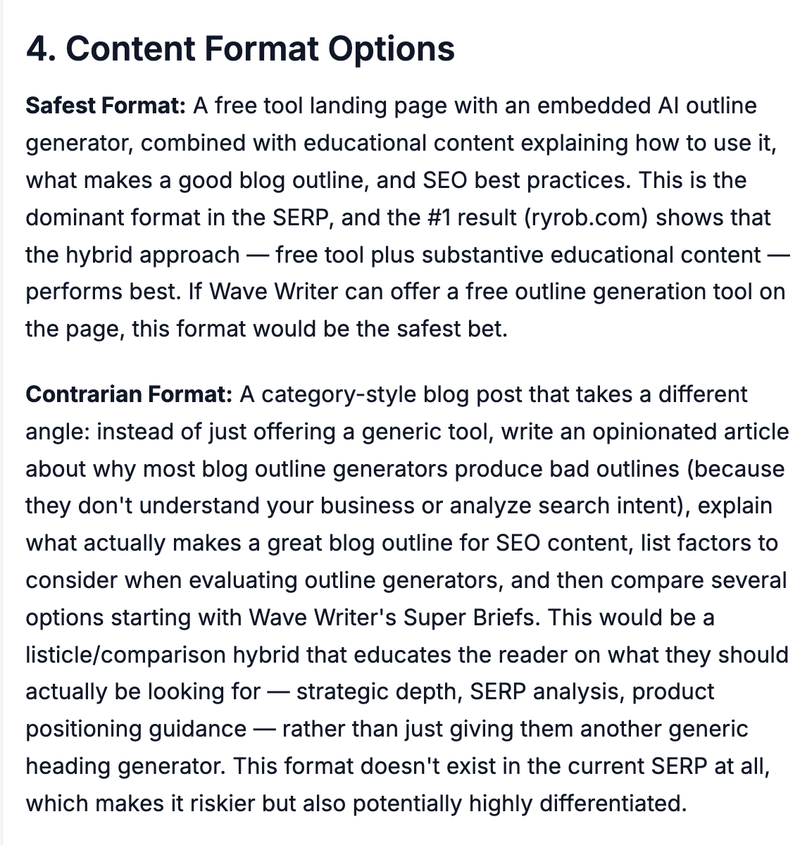
This is only possible because Wave Writer understands your business. Most blog outline generators don't even think about your product. They can't, because they don't know anything about it. They generate headings based on a topic, and your product never enters the picture. Wave Writer knows your products, features, benefits, and competitive positioning, so it can suggest exactly where and how your product naturally fits into the content.
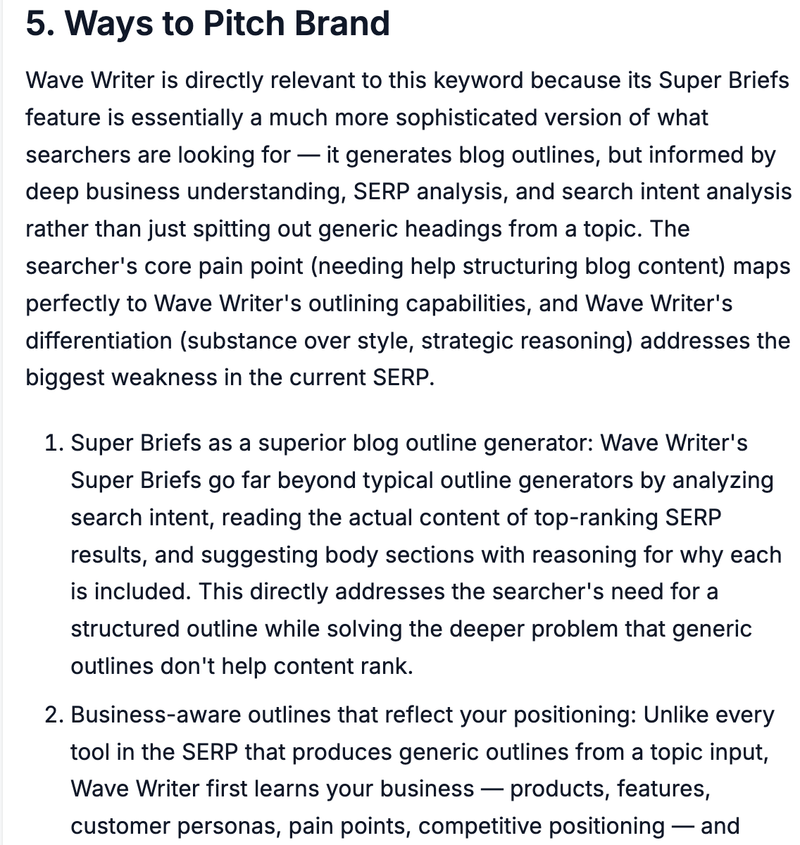
That's the difference between an outline that produces generic content and one that produces content that actually converts.
Body Section Ideas With Reasoning
For body sections, instead of handing you a single rigid outline, Wave Writer suggests multiple sections with explanations of why each is included — how it supports ranking, how it satisfies search intent, or how it contributes to clarity or conversion.
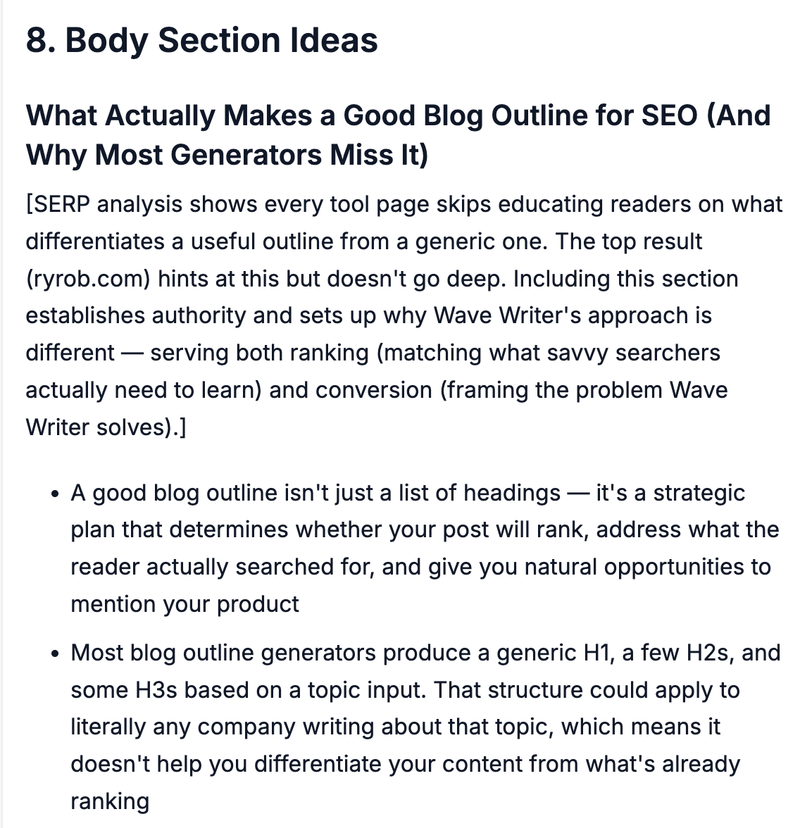
This is designed as a buffet of ideas, not a fixed outline (although many Wave users prefer to just pass all of these to a draft as is, and that's fine). It's designed for a smart marketer to be able to think through what sections make sense for this piece, in what order, reorder if they want, add, delete, or edit as they want.
Notice at the top in square brackets Wave Writer gives its reasoning for each section so you don't have to just blindly trust AI. You're understanding what it saw and why it suggests it, and you can use your human reasoning to agree or disagree. If a section was suggested because the top 3 SERP results all include it and it aligns with search intent, that's useful information. If you think it's wrong, you can cut it. But at least you're making that decision knowing what the AI intended, not just blindly trusting it.
Multiple Fully Written Intros
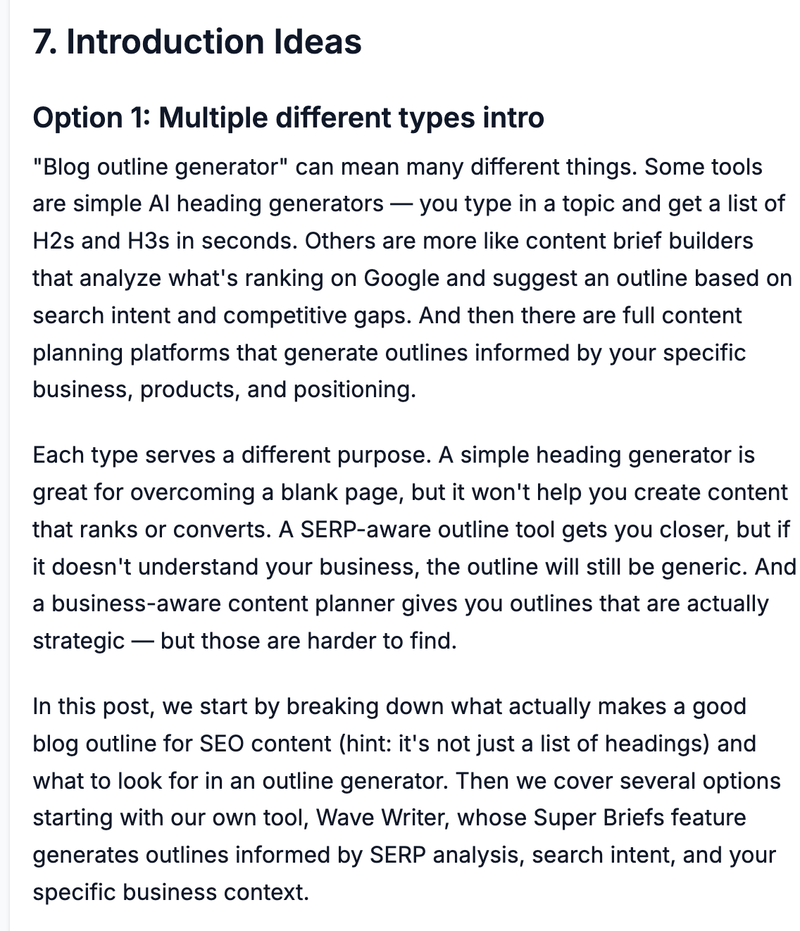
Super Briefs also include multiple fully-written introduction options based on different article intro frameworks taught to Wave Writer by the writers at Grow & Convert. We carefully taught Wave different intro frameworks that we use in our actual client work and when to use each one depending on keyword type and search intent.
We're obsessive about blog intros because they decide whether someone keeps reading or not. And we're sick of bad AI intros. So we made sure Wave didn't produce that slop. These intros are designed to match the reader's mindset, set up the article's unique angle, and avoid the generic patterns most AI tools fall into.
Built by Practitioners, Priced for Teams
Wave Writer was built by the founders of Grow & Convert, a content marketing agency with a decade of experience working with startups to public companies. We're actual practitioners of content writing with high quality standards, not a generic AI wrapper built on top of the same LLMs everyone else uses.
All of this — outline generation, SERP analysis, search intent analysis, and content drafting — is combined in one tool starting at $29/month with all features included, unlimited brands, and unlimited users. You can upload as many sources as the token limit allows (effectively 30 to 60+ depending on source length) to teach Wave Writer your business.
Can't You Just Use ChatGPT or Claude to Generate Blog Outlines?
ChatGPT and Claude can absolutely generate blog outlines. You type in a topic and get a structured list of headings and subheadings in seconds, and they're free. So this is a fair question.
The problem is the same one that plagues all their content output: they don't persistently understand your business, so every outline they produce is generic and could apply to any company writing about that topic.
You can try to solve this by setting up a project and feeding it past materials, but in practice these LLMs tend to forget what you teach them over time. The first few chats work well, then the tool slowly reverts to generic habits. We've experienced this ourselves. You upload your positioning doc, your product pages, your best blog posts. It works great for a session or two. Then a few conversations later it's suggesting outline sections that have nothing to do with your product and everything to do with generic "best practices" it pulled from its training data.
They also don't read all the context reliably each time. You load your past content into a project, but the model doesn't consistently reference it, so outlines routinely miss details you specifically uploaded. You end up correcting it: "No, check the positioning doc, I explained it there." The only real fix is pasting your full context into every prompt, and no one has the patience for that.
We built Wave Writer in a way that fixes this. Every interaction with Wave passes all the relevant context needed to the underlying LLM without you having to think about it. So that way Wave doesn’t “forget” key info when generating an outline or a draft. You don’t have to keep reminding it to read that one file in the project files.
RightBlogger: Free Blog Outline Generator with Keyword and Tone Options
RightBlogger offers a free AI blog outline generator where you enter a blog post title or topic and get a structured outline with an introduction, body sections with subheadings, and a conclusion.
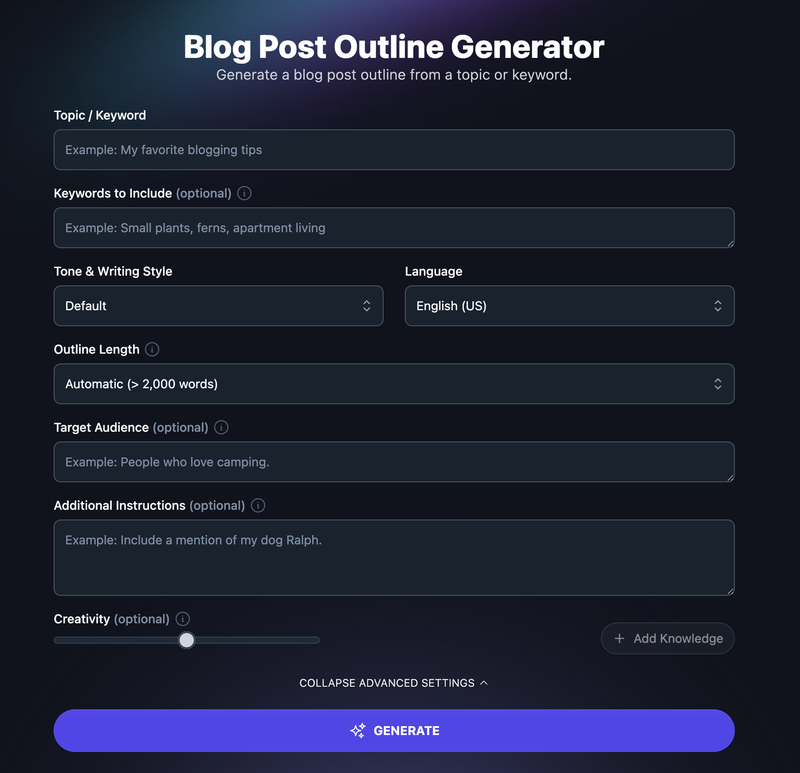
It’s nice that it lets you add additional keywords, select tone, length, and even target audience. But note how it’s missing information about your business. That means, by definition it’s producing generic ideas that any business with any customer could publish for that keyword. Your competitor could use the exact same outline and no one would notice. That’s not ideal.
Ahrefs: Free AI Outline Generator from an SEO Data Powerhouse
Ahrefs offers a free AI outline generator as part of their writing tools suite. You input rough ideas and important points to include, choose a writing tone, and get an organized outline in minutes.
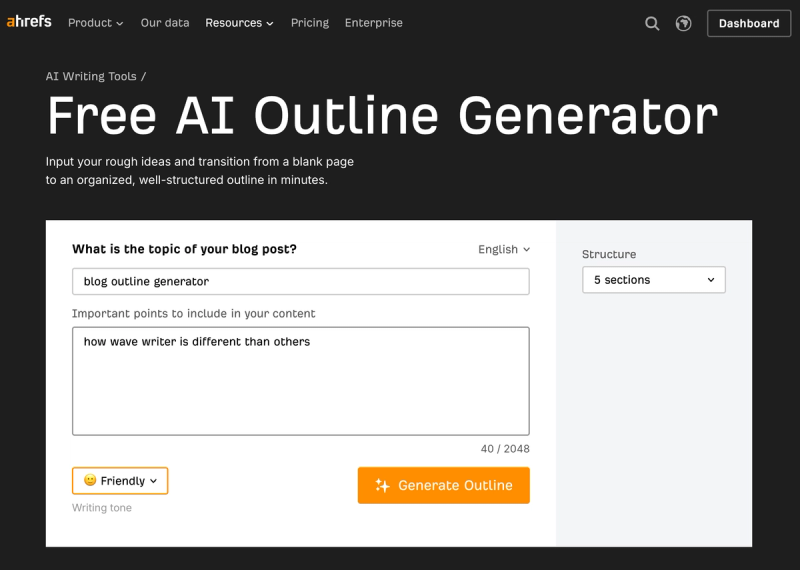
Coming from Ahrefs, you might expect the outline to be informed by their massive keyword and SERP data. But the tool is actually a standalone AI text generator. I don’t see any incorporation of any uniqueness from the brand or the SERP. From my test with the inputs above, it’s output was so generic:
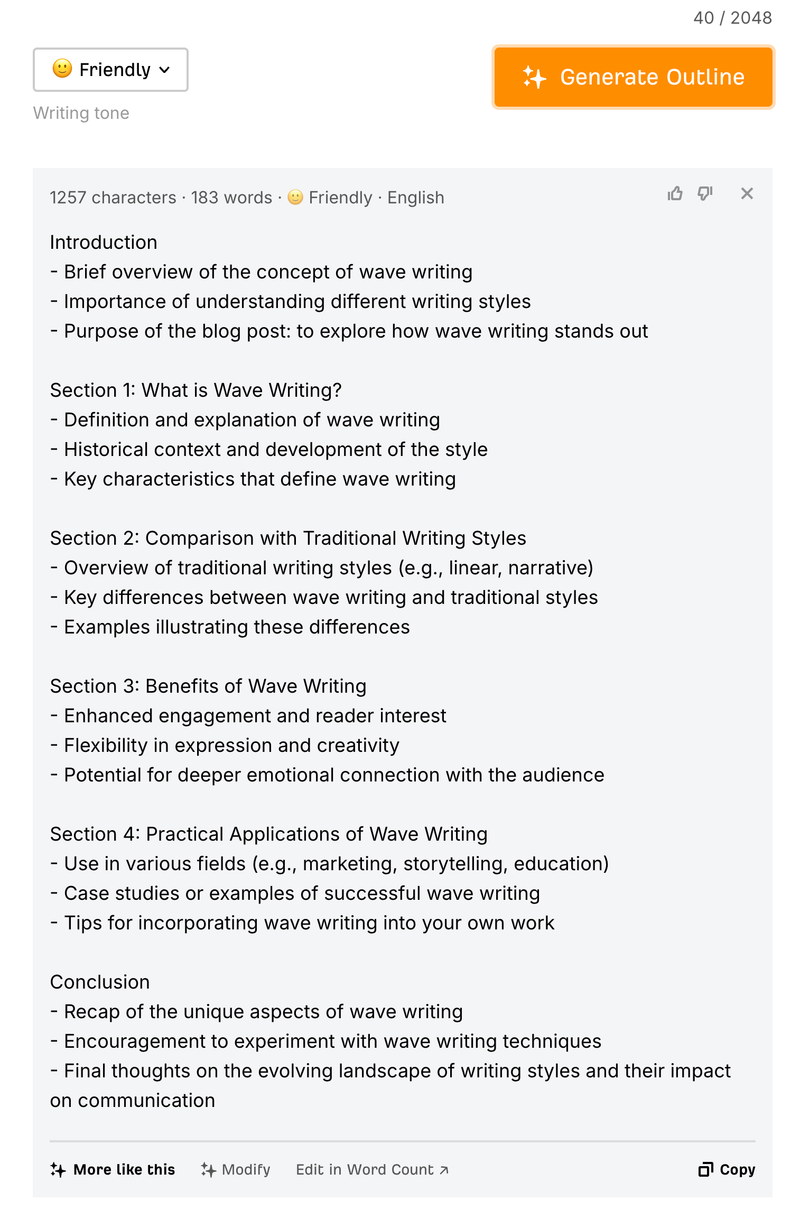
“Section 1: What is Wave Writing?” Yikes.
“Historical context and development of the style” What even is this?
I’m sorry but this is just a gimmick.
Outrank: Free Blog Outline Generator with a Simple Interface
Outrank offers a free blog outline generator with no registration required. You enter a topic or keyword, the AI generates a structured outline with proper H1, H2, H3 hierarchy, and you copy and use it.
The tool emphasizes SEO best practices in its heading structure and claims to understand context and industry-specific terminology. It's designed as a lead generation tool for Outrank's full content suite, where users can turn outlines into complete, publication-ready articles.
The experience is fast and frictionless — no account needed, instant results — making it a decent option if you just need a quick starting structure. The tradeoff is that the outline is generated purely from the topic input with no SERP research, intent analysis, or business context, so the output is generic and requires significant strategic thinking from the user to turn it into a useful content plan.
GravityWrite: AI Blog Outline Template with Headlines and FAQs
GravityWrite offers a Blog Outline template that generates a comprehensive outline including engaging headlines, a summary of main points, and relevant FAQs based on the topic you input.
It's part of a larger blog workflow within GravityWrite — you can take the outline and feed it into their Blog Content tool to generate a full article, or use their Pro Image Brief tool to create image prompts for the post. The tool is straightforward: enter a topic, click create, and get an outline with multiple components you can customize to suit your writing style.
GravityWrite's strength is speed and volume. It's designed for content creators who need to produce a lot of content quickly and want a structured starting point. Like most tools in this SERP, it doesn't analyze search intent, read what's ranking on Google, or incorporate your business's specific products and positioning into the outline. If your content needs to make specific arguments about your product and speak to particular customer pain points, a speed-focused tool is going to miss those nuances.
HubSpot: Free AI Blog Post Outline Generator
HubSpot offers a free AI blog post outline generator as part of their broader suite of free content marketing tools. It fits alongside their blog topic generator, content strategy tools, and CMS.
The tool is embedded within HubSpot's ecosystem, which is appealing for teams already using HubSpot for marketing, sales, or CRM — it integrates naturally into their existing workflow. HubSpot's brand recognition and the free price point make it an easy first choice for many marketers to try.
However, the tool is a basic AI outline generator. It doesn't leverage HubSpot's marketing data, analyze SERPs, or understand your specific business beyond what you input as a topic. It's a quick starting point, not a strategic content planning tool.
Copy.ai: Free Outline Generator for Content Marketers
Copy.ai offers a free outline generator that walks you through the outline creation process: enter a topic, and the AI suggests an outline with an introduction, 3-5 main points, and a conclusion.
It positions itself specifically for content marketers, content managers, and content writers. Copy.ai's broader platform includes workflows for SEO, social media, ecommerce, and sales, so the outline generator can be a starting point that feeds into a larger content production workflow.
The free version is limited to 10 credits per month, and upgrading to the paid plan starts at $49/month for more capacity. Like other tools in this SERP, Copy.ai focuses on speed and format rather than understanding your business substance. The outlines are generic starting points that still require strategic thinking from you to turn into content that ranks and converts.
Canva: AI Outline Generator Built Into a Design Platform
Canva's Magic Write feature includes an AI outline generator built into Canva Docs, letting you generate outlines and immediately start writing and designing in the same platform.
The tool supports 20+ languages and allows collaboration — your team can access and edit the outline together in real time. Canva's strength here is turning outlines into visual-first documents with images, fonts, and graphic elements, making it uniquely suited for content that will live in visual formats like presentations, newsletters, or branded documents. It's available on Canva Free, Pro, NFP, and Education accounts, making it accessible to a wide range of users.
The limitation is that Magic Write uses general AI knowledge and doesn't analyze SERPs, search intent, or your business context. It also has a 200-word input limit and roughly 500-word output limit, which can be constraining for detailed blog outlines. Canva is better suited for teams that value visual integration and collaborative design workflows than for SEO-focused content marketing teams.
Other Blog Outline Generators Worth Mentioning
SEO Review Tools offers a free content outline generator that lets you select a content type (blog, listicle, how-to guide, product review, landing page, etc.), add related keywords, and specify your audience — giving it slightly more customization than most free tools in this space. It also lets you choose your preferred language output, making it useful for multilingual content teams.
Editpad's Blog Outline Generator is a simple free tool: paste a blog topic or keyword, hit submit, and get a structured outline with headings and brief descriptions of what to cover in each section.
Both tools are free and require minimal setup, making them decent options for quick one-off outlines. But neither analyzes SERPs, evaluates search intent, or understands your business.
How to Get the Most Out of Any Blog Outline Generator
Regardless of which tool you choose, here's what we've learned about getting better outlines and better content from them:
Feed the tool as much context about your business as possible. If the generator allows it, don't just enter a generic topic. Include your target keyword, who your audience is, and what you're trying to accomplish with the piece. The number one reason AI outlines fall flat is that the tool doesn't understand what you're actually selling or why it matters.
Before finalizing your outline, manually review the top 5 results ranking for your target keyword. Look at what format Google is rewarding, what topics the top pages cover, and where they're weak or shallow. Then adjust your outline to fill those gaps. Some tools (like Wave Writer) automate this. If yours doesn't, do it manually. Don't skip this step.
Evaluate every section in your outline by asking two questions: does this serve the reader's actual search intent, and does it give me a natural opportunity to introduce my product's strengths? If a section doesn't serve either purpose, cut it. An outline full of sections that don't serve intent or conversion is just organized noise.
Don't treat an AI-generated outline as final. It's a starting point that should be refined based on your strategic judgment, your knowledge of your customer, and what you know about the competitive landscape. The best outlines come from combining AI speed with human editorial thinking.
If you're producing content at scale for multiple clients or brands, look for a tool that maintains separate business context for each brand rather than one that treats every outline the same way regardless of who it's for. Generic outlines become a much bigger problem when you're managing 5 or 10 different brands and every outline sounds the same.
The best outlines include reasoning for why each section exists. If your tool doesn't provide this, add it yourself so that whoever writes the draft understands the strategic purpose of each section, not just the topic label. When a writer knows why a section is in the outline — because it addresses a gap in the SERP, because it satisfies a specific pain point, because it creates a natural product mention — the resulting content is dramatically better than when they're just filling in headings.